EDB to PST Software » How to Convert EDB to Outlook
How to Convert EDB to Outlook?
Steps for converting EDB to PST are not difficult, but important is to follow them accurately, missing a single step lead to carry out the process again which is regretting. Given below are steps to convert EDB to PST:
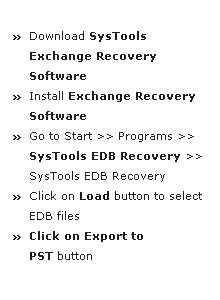
- Firstly, open Exchange Server Recovery software. Go to Start » Programs » Exchange Recovery, then click on the Add File option.

- Now, select the required EDB file by clicking on Browse button from the respective EDB file location. Tool will select STM files automatically in older Exchange versions like 2003 or etc.

- After that select the EDB files (Public or Private) which user wants to convert into PST. Then click on Open button.

- By clicking on Open button, tool will fill the path of selected EDB file in their respective location. Then click on the Add File button.
Note: It has also an Advance option to recover highly corrupted EDB file.

- It will show recovered mailbox databases in the side left panel.

- Then, click on the + button to explore items of the particular mailbox folder.

- Right click on the emails in the right panel to export data directly into PST file. Otherwise user can export data directly from Menu tab by clicking on Export option.

- Then click on the PST option to convert EDB data into PST. Assign destination path to save converted file by clicking on Browse button.

- User can also click on the Split PST option to split PST file from 1 to 45 GB range. Then check or uncheck mailboxes and their sub folders which you want to convert into PST. Click on the Export button.

- A Window will appear showing exporting process of mailbox databases.

- After that a successful completion message will come up on the screen of data export.

- At last it generates report of converted mailbox data into CSV file format. Then click on save button.

- Select the path to save the file in CSV format then click on save button.

- Then report will successfully generate on the selected location.

Getting Started
Save Now! $100

Demo Video